How to Reduce AI Video Generation Costs
AI video generation costs add up faster than most teams expect. A feature that looked cheap in a demo, where someone generated a handful of clips by hand, turns into a real line item once it's running in production against real user volume. The good news is that video generation cost is unusually controllable compared to a lot of other infrastructure spend, because most of the levers available to you don't require changing your product at all — they're decisions about which provider, which resolution, and which model variant you're calling, and those decisions can often be changed without a user ever noticing. This article walks through the levers that actually move the needle, roughly in order of how much control you have over each one.
1. Compare providers for the specific model you're using
This is the highest-leverage lever available, and it's the one most teams skip, because it feels like it should already be handled — surely a model's price is roughly the same wherever you call it from. It isn't. Seedance 2.5, ByteDance's video model, at 720p text-to-video, prices at $0.19 per second on MachGen and $0.473 per second on Fal.ai for the exact same checkpoint — a 2.5x difference for identical output. Wan 3.0 Prime at 480p shows an even wider range: $0.051 per second through Pika (resold via fal.ai) versus a real, live-invoiced rate of $0.17 per second on OpenRouter for the same job, more than a 3x spread.
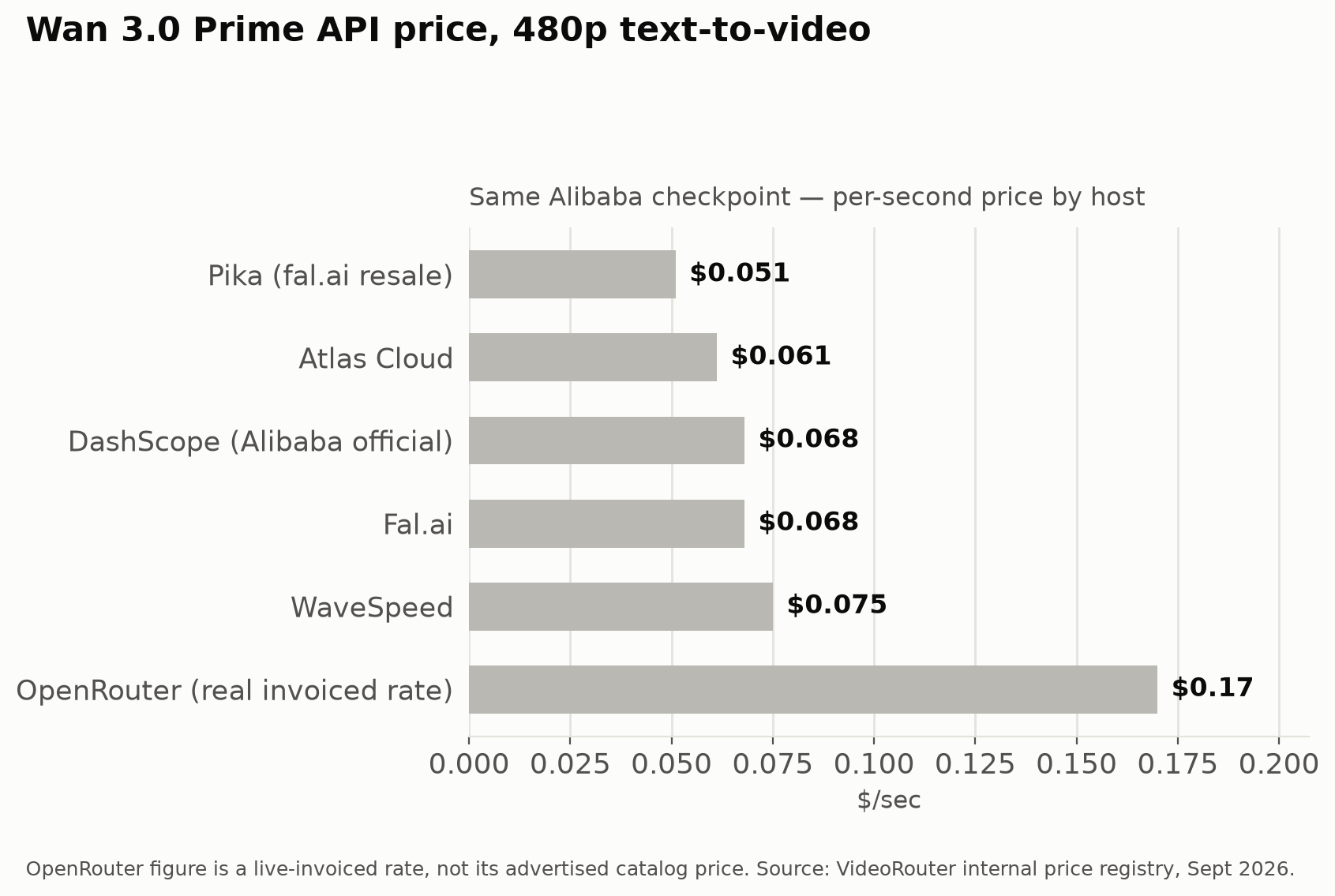
To be fair, this spread isn't universal — some models are fairly commoditized across hosts. Seedream 4.0 differs by only around 11% between WaveSpeed and Fal.ai/Pika, and Flux 1.1 Pro sits at a flat $0.04 on most hosts. But you don't know in advance which category your model falls into, and for models like Seedance 2.5 and Wan 3.0 Prime, checking is the difference between paying full price and paying a third of it for nothing but a different API endpoint. This comparison isn't a one-time task either — discounted rates (like Atlas Cloud's current -20% off its official Seedance 2.5 price) change over time, so a comparison done once when you first integrated a model has a shelf life.
2. Use the cheapest resolution tier your use case actually needs
Video pricing scales with resolution, often steeply, and it's common for teams to default to the highest resolution tier available without asking whether the use case needs it. A background video element in a UI, a thumbnail preview, or a draft/preview generation step shown before a user commits to a final render doesn't need the same resolution as a final deliverable a user downloads or shares. Comparing the per-second pricing for a model across its 480p, 720p, and 1080p tiers (as documented for Seedance 2.5 and Wan 3.0 Prime in the provider data above) shows real, multi-x differences between tiers, not marginal ones — going from a 480p draft tier to a 1080p delivery tier is one of the more direct cost levers available, precisely because it requires no provider change and no model change, just a parameter you're already passing.
The practical pattern here is to segment your product's actual resolution needs rather than picking one resolution for everything: generate at the lowest tier that's visually acceptable for previews, iteration, or internal use, and reserve the higher tier for the specific moment a user is getting a final output. Plenty of products can serve the bulk of their generation volume, previews, retries, A/B variations, at a lower tier and only pay full resolution price for the generations that actually ship.
3. Choose faster or lighter model variants when flagship quality isn't required
Most major model families ship more than one variant: a flagship version tuned for maximum quality, and one or more faster, lighter, "turbo" or "lite" variants tuned for speed and lower cost at some quality tradeoff. This pattern holds broadly across the video and image model landscape — model creators know that not every use case needs their best output, and price the faster variants accordingly. If your product's use case is genuinely quality-sensitive (a hero video for a marketing page, a deliverable a paying customer directly evaluates), the flagship variant is the right call. If it's a background feature, a high-volume low-stakes generation, or something a user is more likely to skim than scrutinize, a faster variant of the same model family is very often close enough on quality while costing meaningfully less. The right move here is testing your actual use case against both tiers rather than assuming — the quality gap for a given task can be smaller than expected, or in some cases larger, and it's worth finding out directly rather than defaulting to flagship out of caution.
4. Batch requests where a provider's pricing rewards it
Some providers structure pricing or throughput in ways that favor submitting work in batches rather than one request at a time — lower effective per-unit cost, better utilization of a job slot, or reduced per-request overhead. Whether this applies, and how much it saves, is provider-specific, so it's worth checking the pricing page or docs for whichever host you're using rather than assuming a flat rate applies regardless of batch size. If your product has any workload that isn't strictly real-time (nightly content generation, a queue of pending user requests, pre-rendering likely-to-be-used assets), batching is worth investigating on whichever host actually rewards it.
5. Consider open-weight models, which tend to have more price competition
Closed-source flagship models — the kind only their creator can serve, like Veo — have exactly as many hosts as the creator chooses to allow, which in practice often means one or two. Open-weight models, by contrast, can be hosted by anyone with the infrastructure to serve them, which is exactly why models like Wan (Alibaba) and Flux (Black Forest Labs) show up across many independent hosts — fal.ai, WaveSpeed, Atlas Cloud, DashScope, SiliconFlow, and others — each competing on price for the same underlying weights. That competitive dynamic is a large part of why Wan 3.0 Prime shows a 3x-plus spread across hosts in the first place: there are enough independent hosts competing for the same traffic that pricing genuinely varies, and a cost-conscious team can benefit from that variance. This doesn't mean open-weight models are always cheaper in absolute terms than closed ones — Veo's flagship tier and MiniMax H3's cheapest host are still worth checking directly, since actual prices depend on the specific model and provider — but it does mean an open-weight model is much more likely to have multiple genuinely competing hosts worth comparing than a closed-source flagship with only one or two places to go.
6. Route to whichever host is cheapest for a given request, instead of hardcoding one
Levers 1 and 5 both depend on knowing which host is cheapest right now, but "knowing" that once and hardcoding it into your integration only captures the savings at the moment you checked. Prices move — a discounted rate expires, a new host enters, an existing host adjusts pricing — and a hardcoded integration doesn't notice any of that. The lever here is architectural: instead of your application code calling one specific provider's API directly, it calls a routing layer that already knows the current price across providers for the model you're requesting, and sends the job to whichever host is actually cheapest at request time. This turns lever 1 (compare providers) from a one-time manual audit into something that happens automatically on every request, without anyone having to remember to re-check pricing pages.
7. Track cost per generation over time
The last lever is less a cost reduction on its own and more the mechanism that makes the other six sustainable. Without visibility into cost per generation over time, price creep on a provider you're using, or the emergence of a cheaper alternative for a model you already depend on, goes unnoticed. A discount that quietly expires, a provider that raises its effective rate, a new competing host that undercuts your current one, none of these show up unless something is actually watching the number. Teams that treat their initial provider comparison as a permanent decision, rather than tracking cost per generation on an ongoing basis, are the ones most likely to be quietly overpaying a year later for no reason other than nobody looked.
Summary table
| Lever | What it involves | Typical impact |
|---|---|---|
| Compare providers for your model | Check price across hosts serving the same checkpoint, not just your first integration | Often 2-3x, per Seedance 2.5 and Wan 3.0 Prime data |
| Use a cheaper resolution tier | Serve previews/drafts at 480p or 720p, reserve top tier for final output | Multi-x between lowest and highest tier, model-dependent |
| Choose faster/lighter variants | Use turbo/lite versions when flagship quality isn't required | Meaningful reduction, varies by model family |
| Batch requests | Submit work in batches where a provider's pricing structure rewards it | Provider-specific, worth checking directly |
| Favor open-weight models | Models like Wan and Flux have more competing hosts than closed flagships | More price competition, wider comparison shopping available |
| Route to the cheapest host per request | Use a routing layer instead of a hardcoded single provider | Captures savings from lever 1 continuously, not just once |
| Track cost per generation | Monitor spend over time, not just at integration time | Catches price creep and missed cheaper alternatives |
Where a router fits into this
The first and sixth levers here, comparing providers and routing to whichever is cheapest, are really the same underlying idea, and they're also the two levers most naturally handled by tooling rather than manual effort. A model router can automatically apply both without ongoing manual work: it already knows the live price across hosts for a given model, and it can send each request to whichever host is currently cheapest, which means the savings from comparison shopping keep applying even as prices shift, rather than only reflecting whatever was true the day someone last checked. VideoRouter (videorouter.sh) is built around exactly that pattern — a single API across many video and image hosting providers, with a live per-model price comparison and automatic routing, so the comparison-and-routing levers in this article happen continuously by default rather than as a periodic manual audit someone has to remember to run.